
Spec Update
There’s been a change in the project 4CD specs, splitting it up into multiple pages. There are NO new requirements for the project and the autograder/skeleton code is the same as before, so if you have already completed the project, you don’t need to do anything!
Project 4: Data
NGrams
In Project 4A, you’ll be working with NGrams data consisting of word history files and a year history file.
Download
cs61b_sp26_ngrams_data.zip.Move the
datafolder underneathproj4asuch that it is on the same level assrcandtests.proj4a ├── data ├── src ├── static ├── testsSee the video below for an overview of the setup process. As this was made with an older version of the project, some of the filenames have been changed since then.
Do not commit your
datafolder to GitHub!The
.gitignorefile should prevent you from callinggit addon it. You can check this by running the following command from yoursp26-s***repository and verifying if the lines below are included in it:$ cat .gitignore ... proj4*/data/ proj4*/*.zip proj4*/*.txt ...If you commit it, please see the Large Files Detected section in Git WTFS to fix it.
Word History File
The NGram dataset comes in two different file types. The first type is a “word history file”. Each line of a word history file provides tab separated information about the history of a particular word in English during a given year.
airport     2007    175702  32788
airport     2008    173294  31271
request     2005    646179  81592
request     2006    677820  86967
request     2007    697645  92342
request     2008    795265  125775
wandered    2005    83769   32682
wandered    2006    87688   34647
wandered    2007    108634  40101
wandered    2008    171015  64395
On each row:
- The first column is the word.
- The second column is the year.
- The third column is the number of times that the word appeared in any book that year.
- You can ignore the fourth column. (If you’re curious, it is the number of distinct sources that contain that word.)
For example, from the text file above, we can observe that the word “wandered” appeared 171,015 times during the year 2008, and these appearances were spread across 64,395 distinct texts.
Year History File
The other type of file is a “year history file”. Each line of a year history file provides comma separated information about the total corpus of data available for each calendar year.
1470,984,10,1
1472,117652,902,2
1475,328918,1162,1
1476,20502,186,2
1477,376341,2479,2
On each row:
- The first column is the year.
- The second column is the total number of words recorded from all texts that year.
- You can ignore the third column. (If you’re curious, it is the total number of pages of text from that year.)
- You can ignore the fourth column. (If you’re curious, it is the total number of distinct sources from that year.)
For example, we see that Google has exactly 1 English language text from the year 1470, and that it contains 984 words and 10 pages. For our project, the 10 and the 1 are irrelevant.
You may wonder why one file is tab separated and the other is comma separated. I didn’t do it, Google did. Luckily, this difference won’t be too hard to handle.
Return to begin Project 4A Task 1: TimeSeries.
Wordnet
In Project 4BCD, you’ll be working with Wordnet data consisting of synset and hyponym files.
Download
cs61b_sp26_wordnet_data.zip.Move the
datafolder underneathproj4cdsuch that it is on the same level assrcandtests.proj4cd ├── data ├── src ├── static ├── tests
This dataset contains the same word history and year history files from the NGrams dataset which you’ll need to complete Project 4D: Wordnet (k!=0) as well as optional bonus features.
As a reminder, do not commit your
datafolder to GitHub!The
.gitignorefile should prevent you from callinggit addon it. You can check this by running the following command from yoursp26-s***repository and verifying if the lines below are included in it:$ cat .gitignore ... proj4*/data/ proj4*/*.zip proj4*/*.txt ...If you commit it, please see the Large Files Detected section in Git WTFS to fix it.
Wordnet Dataset
Before we can incorporate WordNet into our project, we first need to understand the WordNet dataset.
WordNet is a “semantic lexicon for the English language” that is used extensively by computational linguists and cognitive scientists; for example, it was a key component in IBM’s Watson. WordNet groups words into sets of synonyms called synsets and describes semantic relationships between them.
One such relationship is the is-a relationship, which connects a hyponym (more specific synset) to a hypernym (more general synset). For example, “change” is a hypernym of “demotion”, since “demotion” is-a (type of) “change”. “change” is in turn a hyponym of “action”, since “change” is-a (type of) “action”. A visual depiction of some hyponym relationships in English is given below:
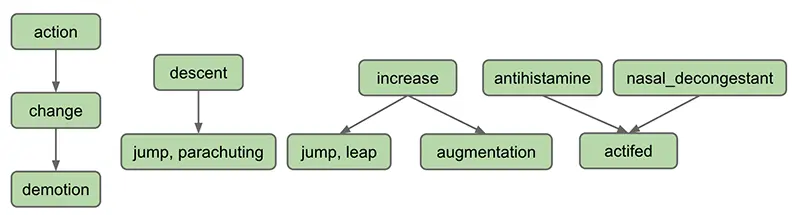
Each node in the graph above is a synset. Synsets consist of one or more words in English that all have the same meaning. For example, one synset is “jump, parachuting”, which represents the act of descending to the ground with a parachute. “jump, parachuting” is a hyponym of “descent”, since “jump, parachuting” is-a “descent”.
Words in English may belong to multiple synsets. This is just another way of saying words may have multiple meanings. For example, the word “jump” also belongs to the synset “jump, leap”, which represents the more figurative notion of jumping (e.g. a jump in attendance) rather the literal meaning of jump from the other synset (e.g. a jump over a puddle). The synset “jump, leap” is a hyponym of “increase”, since “jump, leap” is-an “increase”. Of course, there are other ways to “increase” something: for example, we can increase something through “augmentation,” and thus it is no surprise that we have an arrow pointing downwards from “increase” to “augmentation” in the diagram above.
Synsets may include not just words, but also what are known as collocations. These are multi-word phrases that are represented as a single word due to how common they are together, e.g “nasal_decongestant”.
A synset may be a hyponym of multiple synsets. For example, “actifed” is a hyponym of both “antihistamine” and “nasal_decongestant”, since “actifed” is both of these things.
Here is a list of all of the data files for synsets/hyponyms for this project and a quick explanation on what they will do.
synsets/hyponyms_size 82191
- The full data set from the NGrams data set!
synsets/hyponyms_eecs
- Is a graph containing the names of various courses in ee/cs with two words (“bee” and “bean”) added in for testing.
synsets/hyponyms_size 11,14,16
- Example graphs used from the spec.
synsets/hyponyms_size 10,25,1000
- Subsets of the full data set used for autograder testing.
The autograder will only use synsets/hyponyms_size 10,25,1000,82191 and synsets/hyponyms_eecs for testing - the other files are just for your understanding!
Synset File
We now describe the two types of data files that store the WordNet dataset. These files are in comma separated format, meaning that each line contains a sequence of fields, separated by commas.
The first type of file is a “synset file”. Each line of a synset file provides comma separated information about a synset. The file synsets_size82191.txt (and other smaller files with synset in the name) lists all the synsets in WordNet. The first field is the synset id (an integer), the second field is the synonym set (or synset), and the third field is its dictionary definition. For example, the line
6829,Goofy,a cartoon character created by Walt Disney
means that the synset { Goofy } has an id number of 6829, and its definition is “a cartoon character created by Walt Disney”. The individual nouns that comprise a synset are separated by spaces (and a synset element is not permitted to contain a space). The id numbers are useful because they also appear in the hyponym files, described described below.
Hyponym File
The other type of file is a “hyponym file”. Each line of a hypoynm file provides comma separated information about a hyponym. The file hyponyms_size82191.txt (and other smaller files with hyponym in the name) contains the hyponym relationships. The first field is a synset id, and subsequent fields are the id numbers of the synset’s direct
hyponyms. For example, the following line
79537,38611,9007
means that the synset 79537 (“viceroy vicereine”) has two hyponyms: 38611 (“exarch”) and 9007 (“Khedive”),
representing that exarchs and Khedives are both types of viceroys (or vicereine). The synsets are obtained from the corresponding lines in the file synsets.txt:
  79537,viceroy vicereine,governor of a country or province who rules...
  38611,exarch,a viceroy who governed a large province in the Roman Empire
  9007,Khedive,one of the Turkish viceroys who ruled Egypt between...
There may be more than one line that starts with the same synset ID. For example, in hyponyms_size16.txt, we have
  11,12
  11,13
This indicates that both synsets 12 and 13 are direct hyponyms of synset 11. These two could also have been combined on to one line, i.e. the line below would have the exact same meaning, namely that synsets 12 and 13 are direct hyponyms of synset 11.
11,12,13
You might ask why there are two ways of specifying the same thing. Real world data is often messy, and we have to deal with it.
Return to begin Project 4C Task 1: Dummy HyponymsHandler.