
Spec Update
There’s been a change in the project 4CD specs, splitting it up into multiple pages. There are NO new requirements for the project and the autograder/skeleton code is the same as before, so if you have already completed the project, you don’t need to do anything!
Project 4C: Wordnet (k==0)
Lectures needed for this project:
- Lecture 17 (Extends, Sets, Maps, and BSTs)
- Lectures 21, 22 (Graph Traversals and Implementations)
Partner policy: No partners. Discussing ideas with other students is allowed, but code sharing is not allowed, and the solutions you submit should be your own work! More details on the policies page.
LLM policy: LLMs should not write any of the code that you turn in. See more info in the LLM policies page for more details.
In this project, we will continue building out the browser-based tool NGordnet by adding a new feature to return hyponyms within the WordNet dataset. (Don’t worry we’ll explain this later in the spec).
Unlike Project 4A, the implementation for this part of the project is very open-ended. Deciding on an overall design is an important skill that we’ll also revisit in Project 5. The number of lines of code for this project isn’t necessarily large, but there are a lot of independent decisions that you’ll need to make along the way.
See below or click here for a video introduction to the project. Note that the video might have some slightly outdated sections.
Setup
Follow the Assignment Workflow Guide to get started with this assignment. This
starter code is in the proj4cd folder.
You’ll also need to download the Wordnet data files (they are around 150 MB, which is too large to be pushed to GitHub).
You’ll notice that this skeleton is (almost) the exact same as the Project 4A skeleton. Project 4C/D uses the NGramMap class from Project 4A, which is why we have provided a placeholder implementation for it. This includes a working implementation of the countHistory method. You can try testing with your own implementation but we strongly recommend using the staff implementation.
You may have also noticed that the Plotter class and the other handlers are not in the skeleton. Since they depend on TimeSeries, if you want to use them, you’ll have to copy it in from Project 4A along with your TimeSeries implementation. After importing library-sp26, the code in NGramMap.java should no longer be red.
Task 0: Wordnet Data
Follow the instructions in the Data spec to get the Wordnet data. There, you’ll find descriptions of the dataset. Make sure you understand how each file is structured so you can read and parse it.
Task 1: Dummy HyponymsHandler
- Open the
ngordnet.htmlfile in thestaticfolder in your web browser, just like how you did for Project 4A. Go here for a refresher on how to do this. You’ll see two new things: “Hyponyms” button andkinput. Ignore thekinput for now, as this is for Project 4D.- Try clicking the Hyponyms button. You’ll see nothing happens (and if you open the developer tools feature of your web browser, you’ll see that your browser shows an error).
In Project 4C/D, your primary objective is to implement this button, which will require reading in a different type of dataset and synthesizing the results with the dataset from Project 4A. Unlike 4A, it will be entirely up to you to decide what classes/methods you create to help with this task.
- Start by opening your
Main.javafile.- Create a new file called
HyponymsHandlerthat simply returns the word “Hello!” when the user clicks the Hyponyms button in the browser. You’ll need to create a newHyponymsHandlerclass that extends theNgordnetQueryHandlerclass. See the Handler classes from project 4A for examples. Make sure when you register your handler that you use the string “hyponyms” as the first argument to theregistermethod, and not “hyponym”.- Once you’ve modified
Mainso that your new handler is registered to handle hyponyms requests, start upMainand try clicking the Hyponyms button in your web browser again. You should see text appear that says “Hello”.
Additional resources:
- Staff Solution Webpage: Useful for generating expected outputs for different test case inputs. Use this to write your unit tests!
- Note that this is on the files
word_history_size14377,year_history.csv,synsets_size82191.txt, andhyponyms_size82191.txtand you may get different results based on what files you use!- You can use the visualize graph feature to help visualize the hypo/hypernym relationships. This will not consider start year, end year, or k and visualize the children of a selected synset from the first word in the input list of words.
- Wordnet Visualizer: Useful for visually understanding how synsets and hyponyms work and testing different words/lists of words for potential test case inputs. Click on the “?” bubbles to learn how to use the various features of this tool!
Hyponyms (Basic Case)
In the next 3 tasks, you’ll create a partial implementation of the Hyponyms button. For now, this button should:
- Assume that the “words” entered is only a single word.
- Ignore startYear, endYear, and k.
- Return a string representation of a list of the hyponyms of the single word, including the word itself. The list should be in alphabetical order, with no repeated words. You should sort it case-sensitively (which java already does! Just make sure you don’t put in extra logic to make it case insensitive).
For example, suppose the WordNet dataset looks like the diagram below (given to you as the input files synsets_size11.txt
and hyponyms_size11.txt). Suppose that the user enters “descent” and clicks on the Hyponyms button.
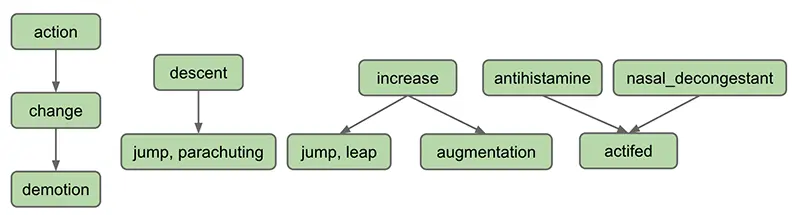
In this case, the output of your handler should be the string representation of a list containing “descent”, “jump”
and “
parachuting”, i.e [descent, jump, parachuting]. Note that the words are in alphabetical order.
As another example, suppose we’re using a slightly bigger dataset such as the one below (given to you as the input
files synsets_size16.txt and hyponyms_size16.txt):
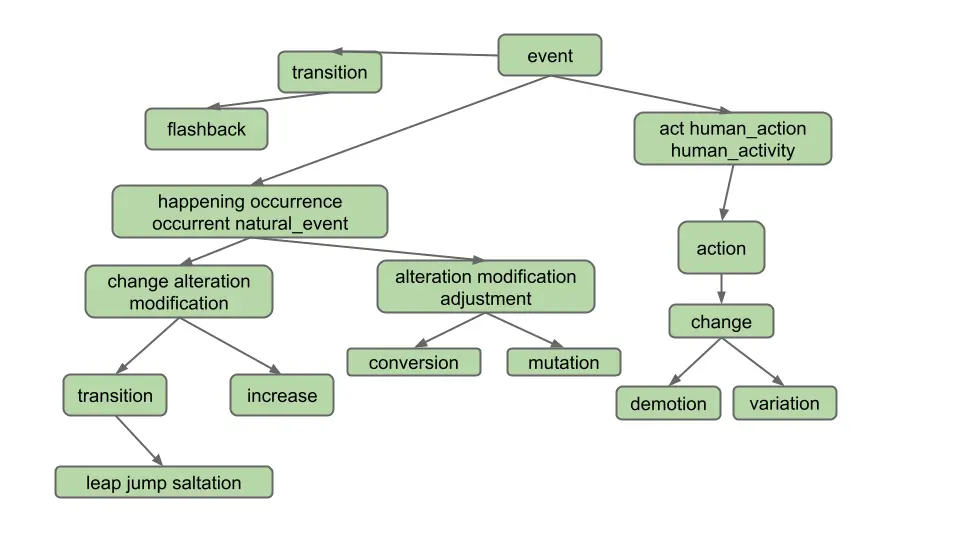
Suppose the user enters “change” and clicks on the Hyponyms button. In this case, the hyponyms are all the words in the blue nodes in the diagram below:
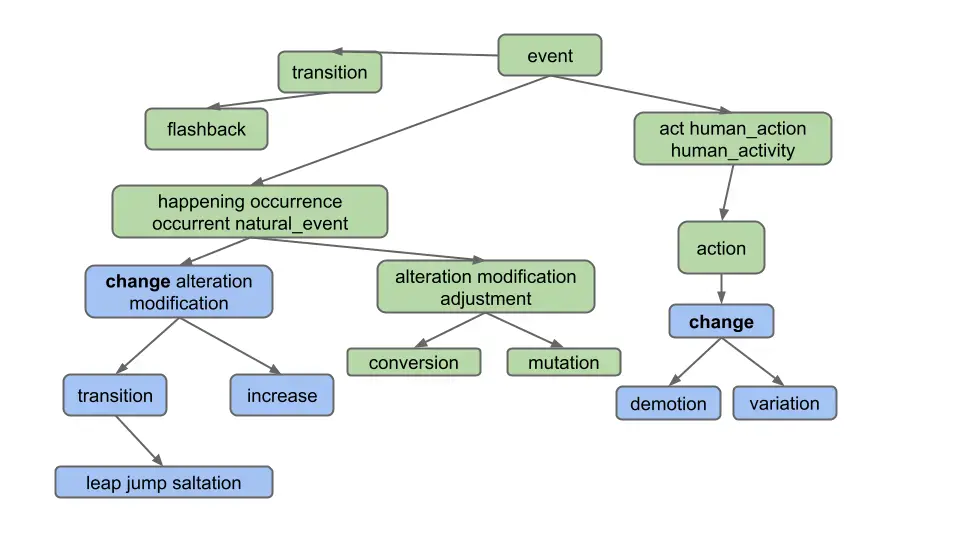
That is the output
is [alteration, change, demotion, increase, jump, leap, modification, saltation, transition, variation]. Note that
even though “change” belongs to two different synsets, it only appears once.
Note: Don’t overthink this and make life harder than it needs to be. Specifically, observe that the output does not include:
- Synonyms of synonyms (e.g. does not include “adjustment”)
- Hyponyms of synonyms (e.g. does not include “conversion”)
- Hyponyms of other definitions of hyponyms (e.g. does not include “flashback”, which is a hyponym of another definition of “transition”)
In other words, solving this problem in the most straightforward way is good enough.
Task 2: Graph Implementation
To get the Hyponyms button working, you’ll need some kind of implementation of a directed graph as described in lectures 21 and 22. We suggest starting this project by creating such an implementation.
Implement a directed graph to represent Wordnet.
This project is unlike any project earlier in the class. We won’t be grading your graph implementation, and we won’t even be telling you what to put into it. That’s your choice.
To decide what methods to include in your graph design, you’ll have to think ahead to how you’ll use it. This will require understanding the entire task described below.
You may also want additional helper classes/methods that represent the idea of a traversal, but this is not required - you can implement your traversal within your graph implementation as well.
For this project, you may not import any existing graph library into your code. Instead, you should build your own graph class or classes. Recall that you are not allowed to use LLMs for code generaton on this project!
Since you’re only going to be creating one implementation, there’s no need to define an interface. That is, rather than having a DirectedGraph interface with several implementations, e.g. AdjacencyMatrixDG and AdjacencyListDG, you should just write a class.
For testing your Graph, see the Testing spec for more information.
Task 3: Reading WordNet Dataset Files
- Parse the Wordnet data files.
- Use your directed graph implementation to store the data.
Design Tips
The Hyponyms button involves having to do all sorts of different lookups, graph operations, and data processing operations. There is no one right way to do this.
Here are some example lookups that you might need to perform on the WordNet dataset:
- Given a word (e.g. “change”), what nodes contain that word?
- Example in synsets_size16.txt: change is in synsets 2 and 8
- Given an integer, what node goes with that index?
- Necessary for processing hyponyms.txt. For example in hyponyms16.txt, we know that the node with synset 8 points at synsets 9 and 10, so we need to be able to find node 8 to get its adjacency list.
- Given a node, what words are in that node?
- Example in synsets_size16.txt: synset 11 contains alteration, modification, and adjustment
Here are some example graph operations you might need to perform:
- Creating a node, e.g. each line of
synsets_size16.txtcontains the information for a node. - Adding edges between nodes node, e.g. each line of
hyponyms_size16.txtcontains one or more edges that should be added to the corresponding node. - Finding reachable nodes, e.g. the nodes reachable from node #7 in
hyponyms_size16.txtare 7, 8, 9, 10.
Your life will be a lot easier if you select instance variables for your classes that naturally help solve all six of the problems above.
Note: If you over-engineer and write methods that you end up not needing, that’s fine.
Just like NGramMap, you’ll want your helper classes to only parse the input files once. Do not create methods that have to read the entire Wordnet file every time they are called. This will be too slow!
Also, a reminder from Project 4A: Deeply nested generics are a warning sign that you are doing something too complicated. Either find a simpler way or create a helper class to help manage the complexity. For example, if you find yourself trying to use something like Map<Set<Set<..., you have started a walk down an unnecessarily difficult path.
If you have a design that is painful and with which you cannot make progress, don’t be afraid to delete your existing instance variables and try again. The hard part of this project is the design, not the programming. You can always use git to recover your old design if you decide you actually liked it.
Task 4: Traversing the WordNet Graph
Use an algorithm on your directed graph implementation to return the hyponyms of the query.
Now that you have a way to represent the WordNet dataset in memory, the last step in building the Hyponyms button is writing code that takes a word, and uses a graph traversal to find all hyponyms of that word in the given graph.
We recommend adding code to a WordNet class so that a WordNet object is able to take a word and return its hyponyms.
Design Tips
Here are some example data processing operations you might need in this task:
- Given a collection of things, how do you find all non-duplicate items? (Hint: There is a data structure that makes this very easy and efficient). Don’t be afraid to also search the internet for the data structure that you choose (e.g. if you choose to use a TreeMap for whatever reason, feel free to look up “TreeMap methods java”, “Map methods java”, or “Collection methods java”, etc).
- Given a collection of things, how do you sort them? (Hint: Google how to sort the collection that you’re using)
For testing your WordNet and the Single Word case, see the Testing spec for more information.
For testing in browser and debugging tips, see the Testing in Browser and Debugging sections of the Testing spec.
Handling Lists of Words
Your next objective is to handle lists of words. As an example, if the user enters “change, occurrence” for the diagram below, we should only return common hyponyms of each word, i.e. [alteration, change, increase, jump, leap, modification, saltation, transition]. “Demotion” and “variation” are not included because they are not hyponyms of both words; specifically, they are not hyponyms of “occurrence”.
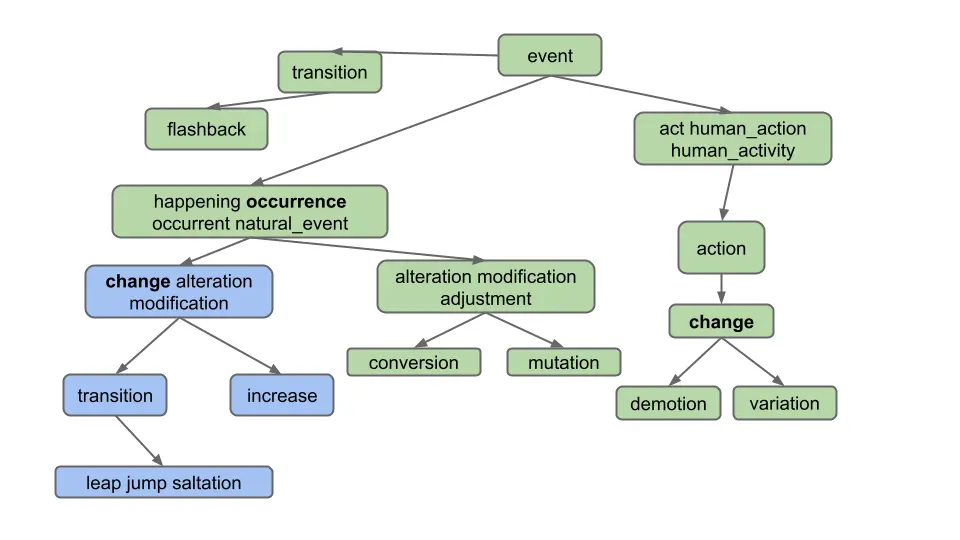
As you can see, we only want to return words which are hyponyms of ALL words in the list. Furthermore, note that the list of words provided by the user can include more than just 2 words, even though our examples in this spec do not.
Note that it is possible for two words to share hyponyms without necessarily sharing nodes. Take a look at this example. If the user enters “car, bug” for the diagram below, we should get [beetle], not [] (empty list)! This example shows that we are getting the intersection of words, not nodes.
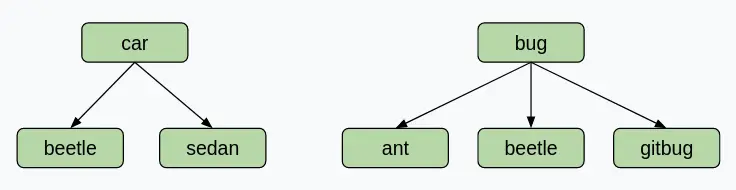
For some more examples which demonstrate the usefulness of this feature, let’s say we are using the full synsets_size82191.txt and hyponyms_size82191.txt.
- Entering “video, recording” in the words box and clicking “Hyponyms” should display
[video, video_recording, videocassette, videotape], as these are all the words which are hyponyms of “video” and “recording”. - Entering “pastry, tart” in the words box and then clicking “Hyponyms” should display
[apple_tart, lobster_tart, quiche, quiche_Lorraine, tart, tartlet ].
Task 5: Lists of Words
Modify your
HyponymsHandlerand the rest of your implementation to deal with the List of Words case.
To test this part of your code, we recommend manually constructing examples using synsets_size16.txt and hyponyms_size16.txt and using the provided front end to evaluate correctness.
For testing the List of Words case, see the Testing spec for more information.
Task 6: Autograder Buddy
Throughout this assignment, we’ve had you use your front end to test your code. Our grader is not sophisticated enough to pretend to be a web browser and call your code. Instead, we’ll need you to provide a method in the AutograderBuddy class that provides a handler that can deal with hyponyms requests.
When you ran git pull skeleton main at the start of this spec, you should have received a file called AutograderBuddy.java.
Open AutograderBuddy.java and fill in the getHyponymHandler method such that it returns a HyponymsHandler that uses synsetFile and hyponymFile. Your code here should be quite similar to your code in Main.java.
Now that you’ve created AutograderBuddy, you can submit to the autograder. If you fail any tests, you should be able to replicate them locally as Truth tests by building on the test files above. If any additional data files are needed, they will be added to this section as links.
Submission
Try submitting to the autograder. You may or may not pass everything.
- If you fail a correctness test, this means that there is a case that your local tests did not cover.
- The autograder will not run unless you fix all your style errors. Reminder that you can check style in IntelliJ as often as you’d like:
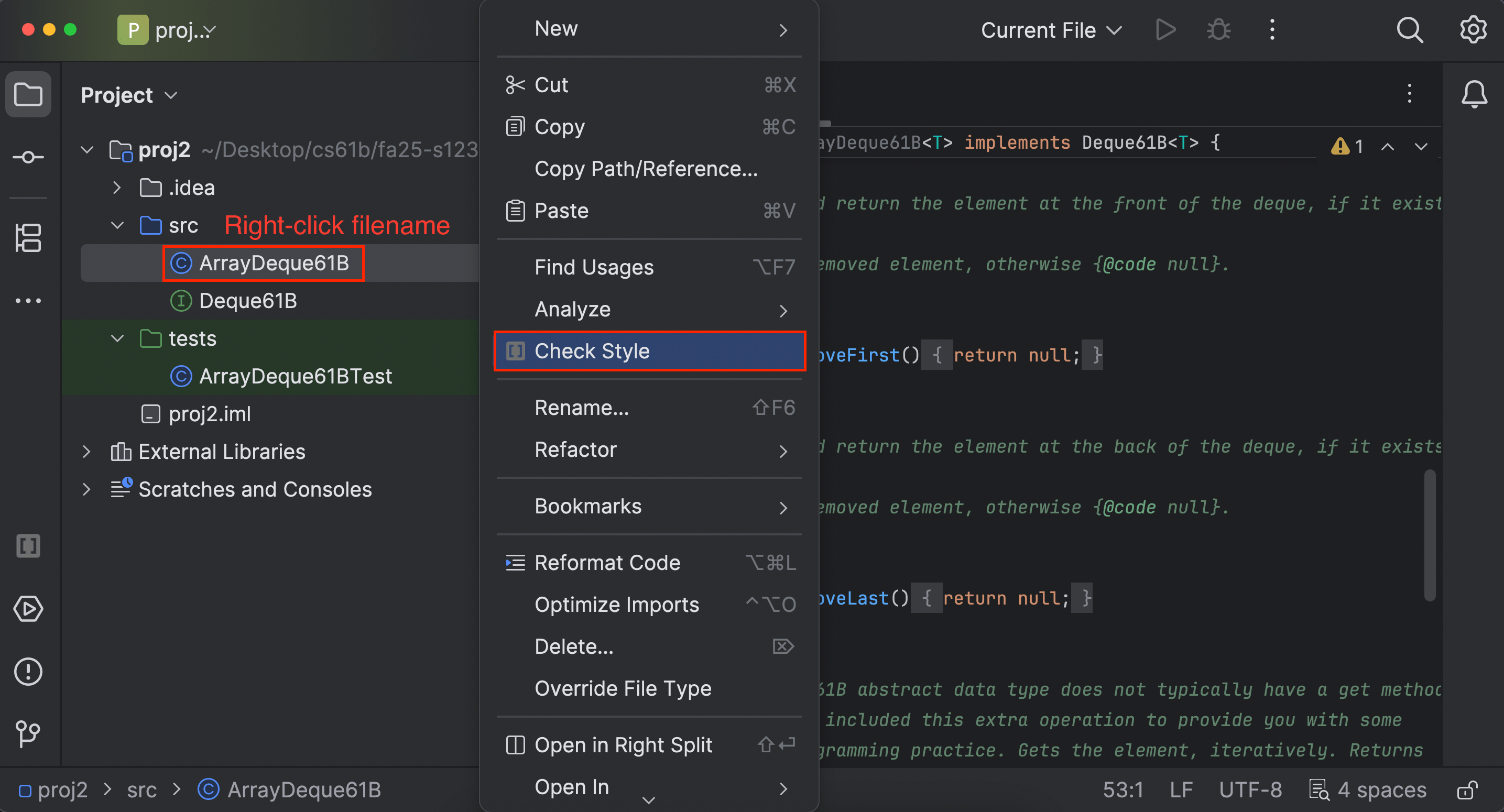
- You will have a token limit of 4 tokens every 24 hours. We will not reinstate tokens for failing to add/commit/push your code, run style, etc.
Project 4C will be worth 160 points.
Grading breakdown:
- HyponymHandler k == 0 Single Word (50%)
- HyponymHandler k == 0 Multi Word (50%)
The score you receive on Gradescope is your final score for this assignment (assuming you followed the collaboration policy).
The WordNet part of this assignment is loosely adapted from Alina Ene and Kevin Wayne’s Wordnet assignment at Princeton University.