Deadlines
| Assignment | Tasks | Deliverable | Points | Due Date |
|---|---|---|---|---|
| Project 5A | - Partnerships - Setup - Design Document |
Partnership formation | 10 | Friday, Apr 10 11:59pm PT |
| Design Document | 50 | Wed, Apr 15 11:59pm PT |
||
| Project 5B | - World Generation | World Screenshots on Gradescope | 40 | Tues, Apr 21 11:59pm PT |
| Project 5C | - Task 1: Main Menu - Task 2: Interactivity - Task 3: HUD - Task 4: Saving and Loading - Task 5: Pathfinding - Task 6: Ambition Features |
Code on Gradescope |
150 | Tues, Apr 28 11:59pm PT |
| Live Checkoff with TA (Checkoffs will happen 4/27 – 5/01) |
150 |
Ambition Features
90 points of your project score will be based on features of your choosing, which we call your “ambition score”. The big idea is that beyond the base requirements of this project, we want you to try to polish your product a bit more and add some cool features. Below is a list of features worth either 60 points (primary feature) or 30 points (secondary feature).
From these two categories, you need to implement 90 points of features, and at least one of your features must be a primary feature. There will be no extra credit beyond the 90 points for this. Here are some ways to achieve this:
- One primary feature and one secondary feature. This is the most common way.
- Two primary features.
Your project must still meet the basic requirements described earlier in the spec! For example, if you allow the user to use mouse clicks, the project should still allow keyboard based movement!
Under the description of some primary features, we’ve provided some GIFS that would score full points on their respective ambition point items to help clear any confusions. Yours do not need to look exactly like the examples given.
If you guys want to work on different ambition features at the same time, we would like to recommend using branches to manage them! There won’t be an explicit guide here but you can checkout the relevant portion of the git guide here.
Custom Ambition Features
You are not restricted to the features we list below! We strongly encourage you to come up with your own. We have an Ed megathread (Custom Ambition Feature Request Ed thread) where you can run your ideas by us to confirm that it meets our standards.
We cannot guarantee custom ambition feature approvals after the 5A deadline, April 15, though we will try our best to get through every request. We will officially close responses to the thread after the 5B deadline, April 21.
Files
For some ambition features, you might customize your world through custom images, audios, and other assets. Make sure to upload these files into your project and organize them accordingly.
In addition, use relative file paths instead of absolute file paths. For instance, if you have your music file menu_music.wav under a separate package called music underneath src, you can reference it as music/menu_music.wav.
Doing both of these steps will allow anyone who has your project on their laptop to be able to view and use your files.
Primary Features (60 points)
-
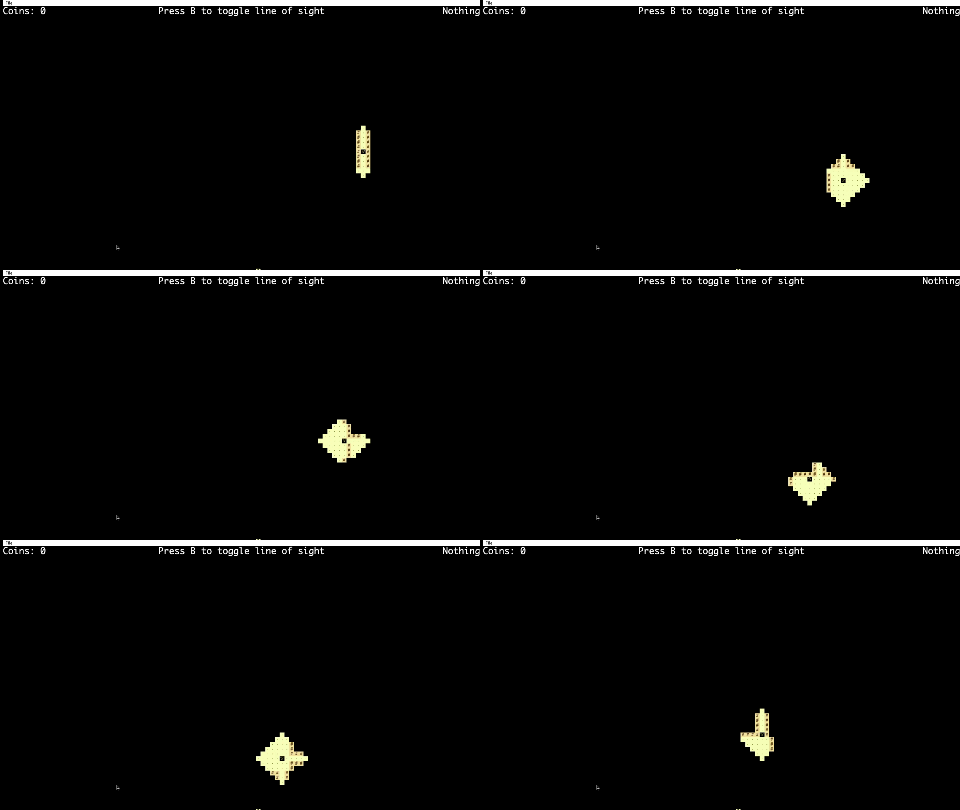
Line of Sight: Create a system so that the tile renderer only displays tiles on the screen that are within the line of sight of the avatar. The line of sight must be able to be toggled on and off with a keypress. Note the line of sight should NOT go through walls although it is fine to be able to wrap around walls/corners. This also means that the line of sight must be long enough such that we can tell if it goes through a wall or not. Here are two examples of line of sight features that we will NOT accept:
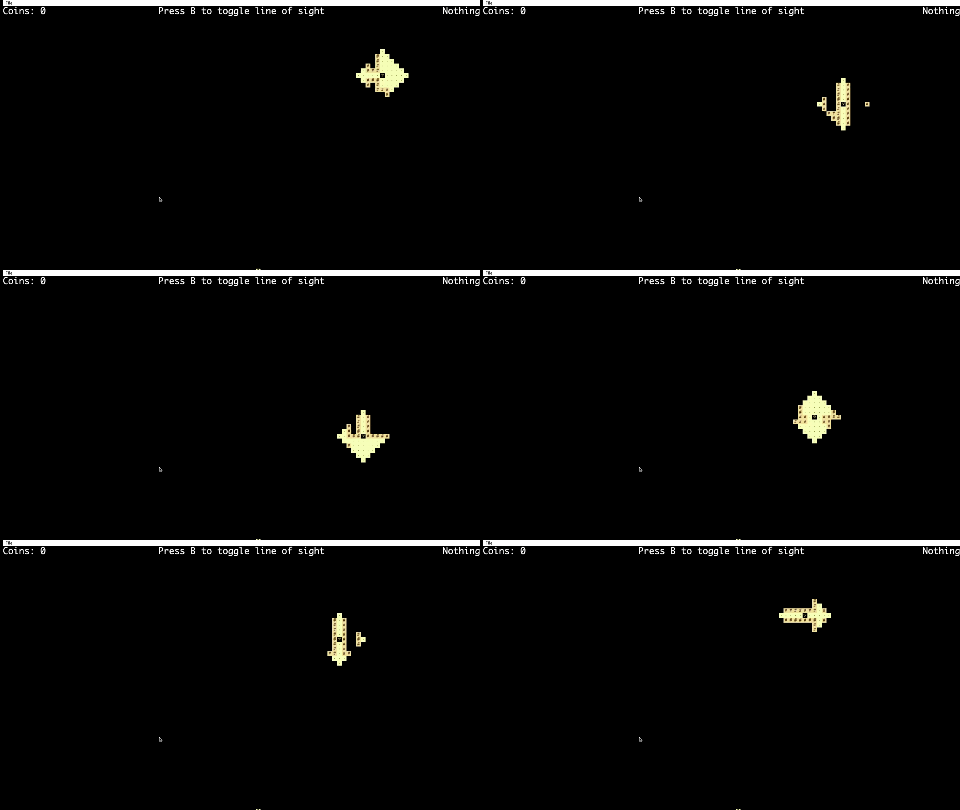
On the other hand, here is what an acceptable solution would look like:
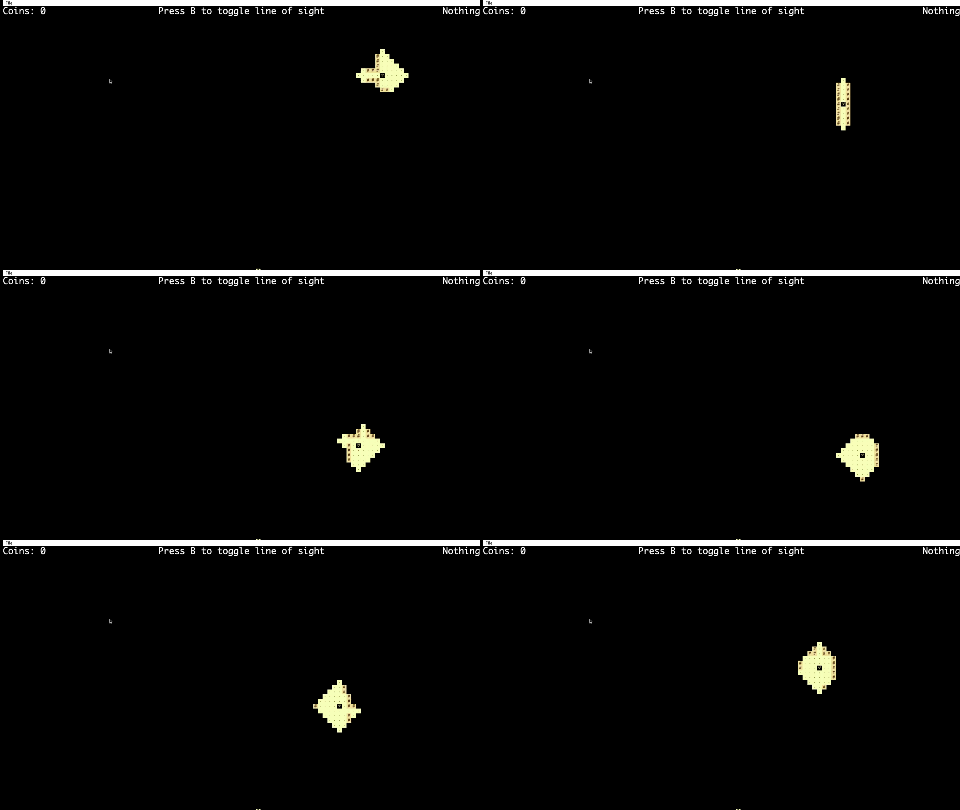
Note how the correct one isn’t based on any certain shape (the example is a diamond but a width by height box also will not be allowed) but rather “moves” along with how the character moves. Solutions that are based on showing a box/diamond centered on the character will not be allowed/given full credit.
-
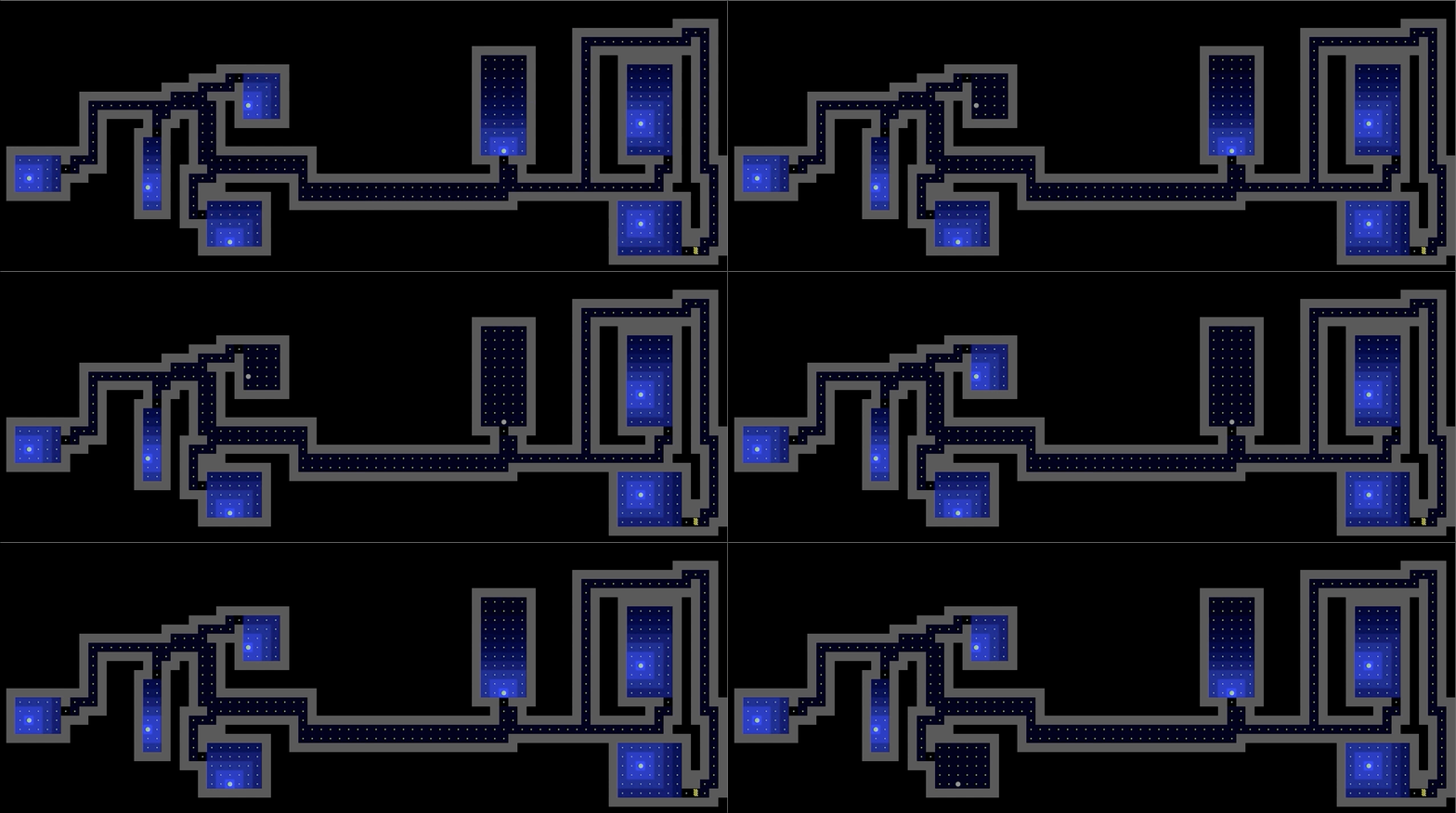
Light Sources: Add the ability for light sources to affect how the world is rendered, with at least one light source that can be turned on and off with a keypress. The intensity of the light must diminish in a gradient as the distance from the source increases. Light sources should fill a majority of the room it belongs to, and light should not pass through walls.
-
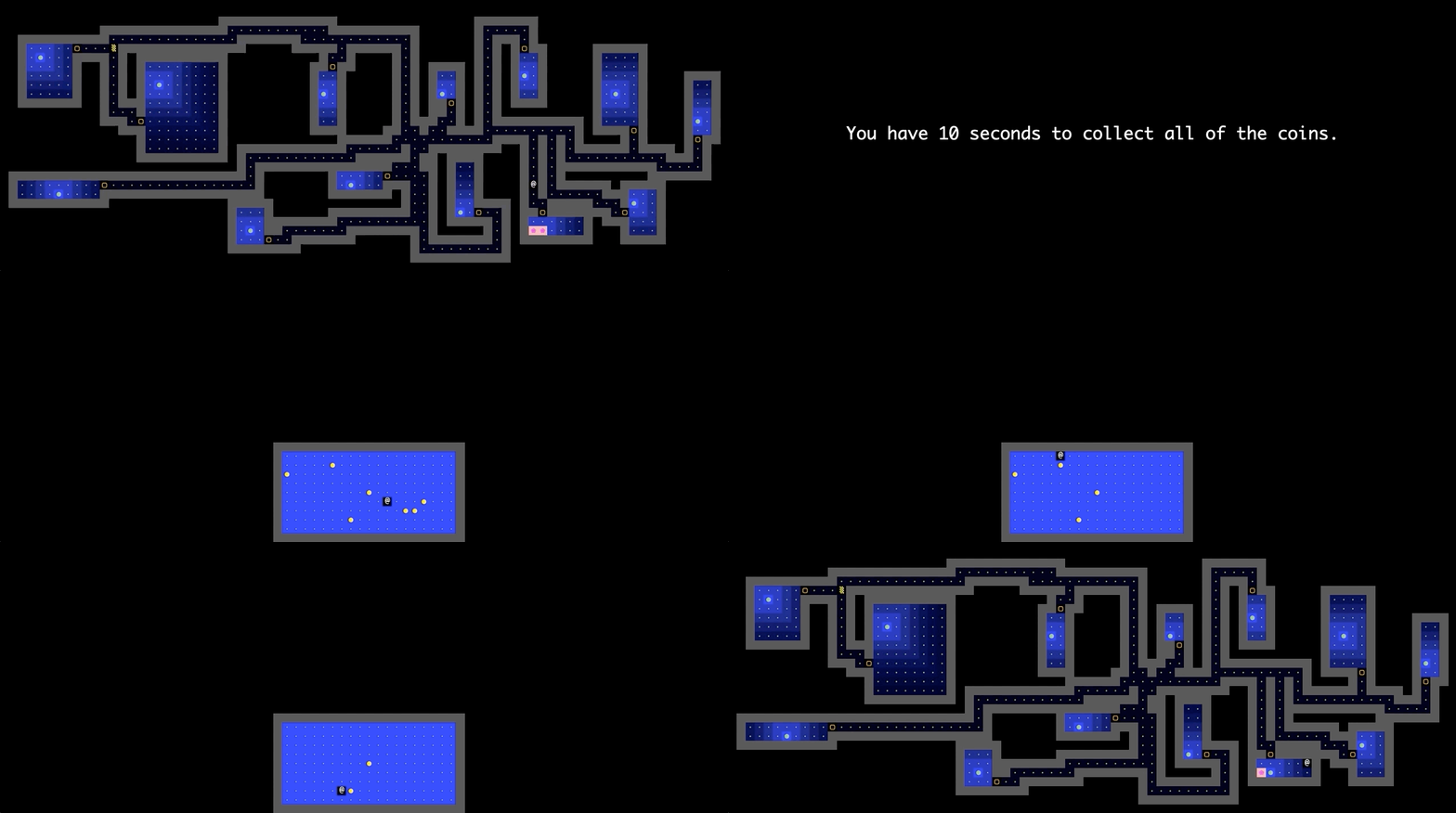
Encounters: Create a system for “encounters”, where a new interface appears when the avatar interacts with entities in the world, returning the avatar to the original interface when the encounter ends (e.g. Pokémon). Note that the world must be in the same state it was before the encounter, after the encounter ends. It’s okay if save/load is not available during encounters.
-
Undo, Redo and Restart: Add the ability to undo moves, redo moves, and reset your world using three different keypresses. The redo key should do nothing if the most recent action was not an undo.
-
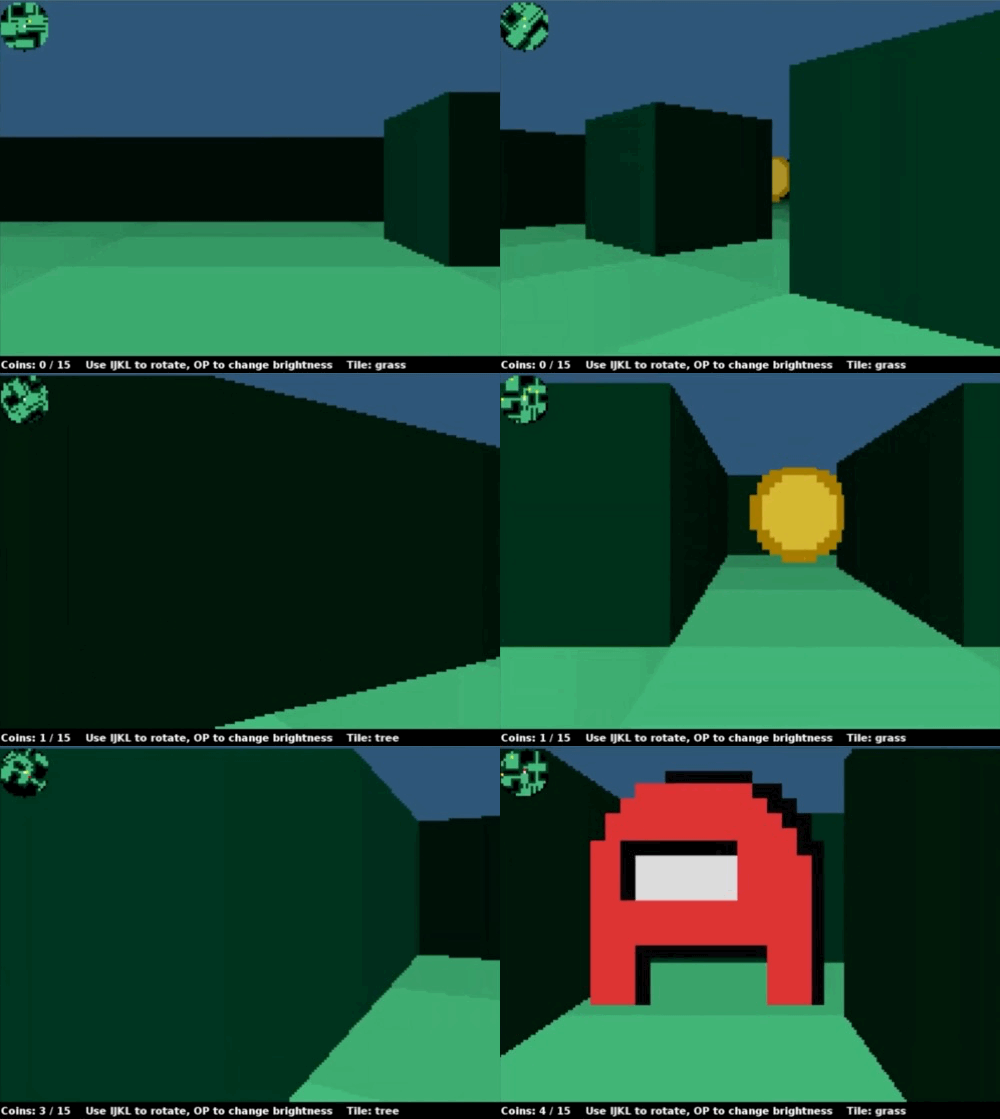
Perspective: Add the ability for the user to change the perspective of their view (first-person, isometric 2.5D, 3D, etc.) (We’ve never seen anyone do isometric 2.5D or full 3D before! The Nintendo 64 game ‘Kirby 64 - The Crystal Shards’ is an example of what an isometric 2.5D world looks like). One particularly interesting example is Dorottya Urmossy and David Yang’s Fall 2022 submission, which is a 2.5D first-person view, i.e. the world is 3D but the entities are 2D.
-
Battle System: Implement a battle system that allows players to interact with moving enemies and obstacles. Assign the player a health value, place collectibles that restore health around the map, and create randomly-moving enemies/objects that inflict damage on and receive damage from the player.
-
Explorer: Make your world larger than the preset display size such that the player can “explore” beyond the starting world. The rendered world should move with the player beyond a certain point and be scrollable.
-
Wrap: Make your world “wrap” around the border of the rendered world, where the player should be able to enter from one side of the screen and exit from the opposite side interchangeably. In order to wrap, you must have rooms on the edge of the world that clip off such that the opposite side also has a room that is clipped off, allowing the player to continue traveling on the floor tiles. The world should still follow the World Requirements from Part B excluding requirement #10.
-
Online Multiplayer: Add online multiplayer where other users can join and leave the current game.
java.net.Socketmight be useful here. All players must have the ability to do interactivity (moving, save/load, etc) -
NPCs: Add NPC interaction and dialogue with the player. Allow the player to choose different response options depending on the NPC and/or game state. Let us know if you do any cool realtime API calls to an LLM service.
-
Levels: Implement elevators/navigable floors with a toggleable multi-floor view or with a significantly different interface with the ability to go back to the main world.
-
Altered Terrain: Implement the ability for the avatar to significantly alter the landscape of the world, e.g. digging, triggering traps that cause parts of the world to become dangerous or impassible, solving puzzles that make some rooms accessible only after fulfilling some objective.
Secondary Features (30 points)
-
Replay: Add the ability for the user to “replay” their most recent save, visually displaying all the actions taken since the last time a new world was created. This must result in the same final state as would occur if the user had loaded the most recent save. This means that the game should be playable once the replay is complete.
-
Save Slots: Add multiple save slots that can be accessed with a new menu option, and a new keyboard shortcut to save to a slot other than slot 1. You should be careful to still support the default behavior of saving and loading in order to be consistent with the replay string requirements.
-
New World: Add the ability to create a new world without closing and reopening the project, either as a special option you can press while exploring, or when you reach a “game over” state if you’ve turned your world into a game.
-
Custom Avatar: Make your engine render images instead of unicode characters, and add a menu option to change your avatar’s appearance to a custom image created by you.
-
Theme: Make your engine render images instead of unicode characters, and add a menu option to select the environment/theme of the world will be.
-
Language: Add a menu option to change all text in the interface to a different language. English should be the default and there should be a way to switch it back to English.
-
Audio: Add cool music to both your menu and exploration interface, as well as sound effects for interactions the avatar makes with the world.
-
Minimap: Add a minimap somewhere which shows the entire map and the current avatar location. This feature is a lot more interesting if you also implement a map which is larger than the screen so that you are unable to see the entire map normally.
-
Rotate: Add ability to rotate the world, i.e. turn the board 90 degrees and adjust movement keys accordingly.
-
Local Multiplayer: Add support for 2 users to interact at the same time. This will require that you have two avatars on screen which can move around, and they should have separate control schemes.
-
Moveable Blocks: Add ability for the player to place and remove blocks based on a sequence of keypresses.
-
Coins: Add the ability for the user to collect coins. Once all coins are collected, the user should be returned to the main menu, where they are given the option to either start a new game, load a previous world, or quit.