Design Doc Guide
A design document describes an approach to a specific technical problem. In the context of software engineering, it serves as the blueprint and specification for a software program or feature. Design documents are useful in both communicating and organizing your approach, while also being dynamic drafts that encompass the abstract details of the project.
Design Documents
For this class, design documents will consist of the following components:
- Data
- Data Structures
- Algorithms
- Complexity
- Questions (Optional)
- Diagram
Data
What data will you be using? What does the data consist of and how will you parse it for your program? How will your program use the data?
Data Structures
What data structures will you be using? How will your data structures use the data? How will your program use the data structures?
Algorithms
What algorithms will you be using? How will your algorithms use the data structures and data? How will your program use the algorithms?
Complexity
What is the input? How does the time and space complexity change with the input? What are the bounds?
Questions
Open Questions
What questions have come up while brainstorming your design? Consider asking them in office hours!
Closed Questions
Move questions here once you’ve found an answer. Logging your decision-making process provides essential context for others wishing to understand/contribute to your work.
Diagram
Visualize your data structures and algorithms into a diagram, such that someone seeing your document for the first time could quickly get a general idea of your implementation. You can use any drawing tool you like, but if you are unsure and looking for one, you can use draw.io
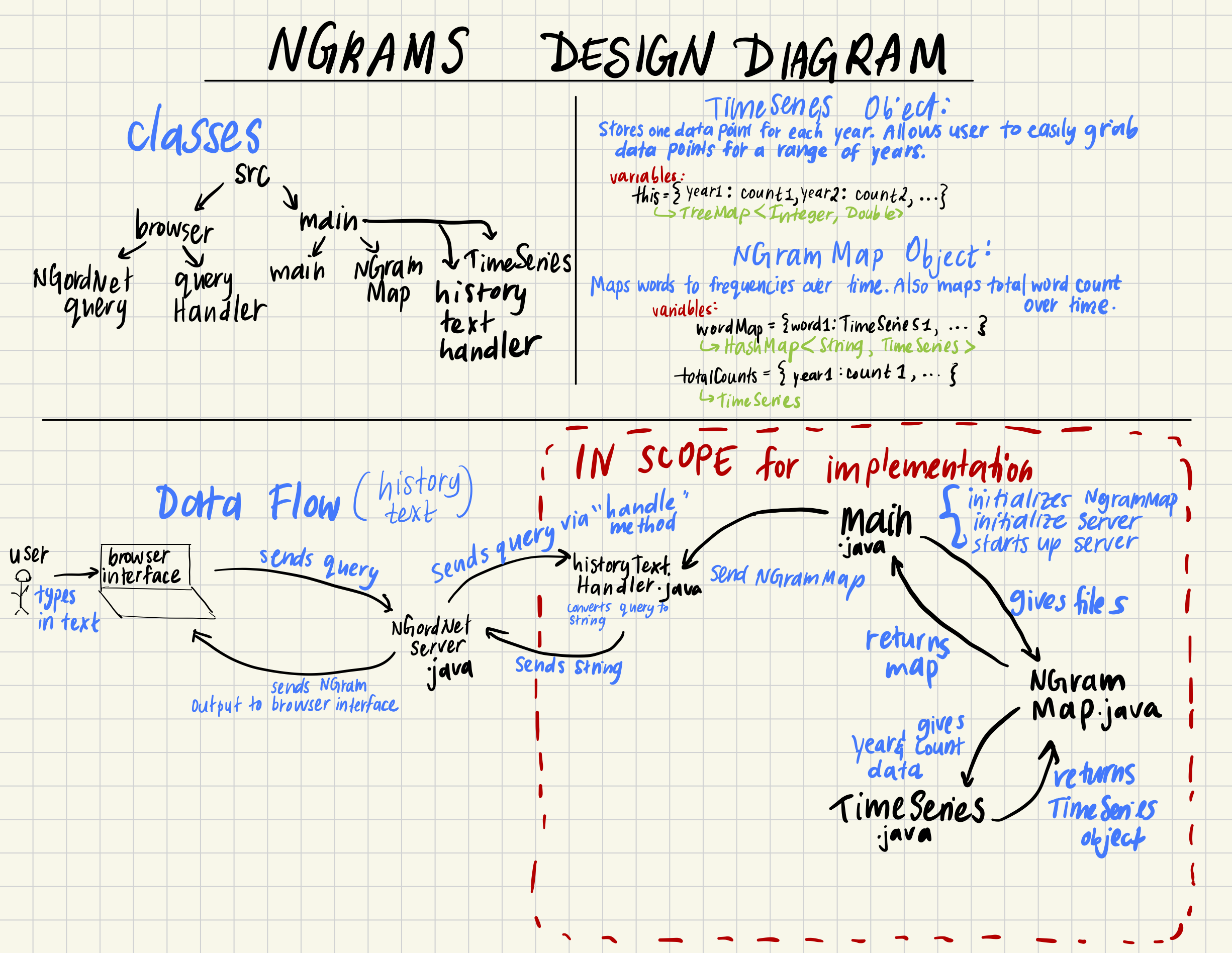
NGrams Example
See this example design document for Project 4A: NGrams by Esha Potharaju.
Percolation Example
Below is an example design document for Project 3: Percolation. Note that this solution is not fully correct.
Data
Not applicable for the Percolation assignment.
Data Structures
UF percUFof sizeN*N + 2(grid plus virtualTop and virtualBottom).
Used to answerpercolates()efficiently.boolean[][] opentracks open sites.
Algorithms
Constructor
- Set up:
open[N][N] = falsepercUF = new WeightedQuickUnionUF(N*N + 2)withvirtualTop = N*N,virtualBottom = N*N + 1
- Don’t open or pre-connect anything.
open tile method:
open(int row, int col)- High-level pseudocode below (Note to self: Order of union calls doesn’t matter.)
checkBounds(row, col)
if open[row][col] is true: return because already open
open[row][col] = true

// convert to one dimensional index
int id = xyTo1D(row, col)

// if opened site at the top, connect to the virtual top
if row == 0:
    percUF.union(id, virtualTop)

// if at the bottom, connect to the virtual bottom
// note: don't connect the fullUF because we want
// to avoid backwash
if row == N-1:
    percUF.union(id, virtualBottom)

for each neighbor (nr, nc) in {up, down, left, right}:
    if inBounds(nr, nc) and open[nr][nc]:
        int nid = xyTo1D(nr, nc)
        percUF.union(id, nid)
Check if tile is open:
isOpen(int row, int col)- If in bounds, just return
open[row][col].
Check if tile is full:
isFull(int row, int col)- If in bounds, just return
percUF.connected(xyTo1D(row, col), virtualTop).Check if board percolates:
percolates()- Return
percUF.connected(virtualTop, virtualBottom).
Complexity
Let N be the N in the N-by-N grid of sites, where N² be the number of sites.
- Constructor: Θ(N²) time, to build the arrays and union find objects, Θ(N²) space to store
open[][]and the union find objects. open: Θ(1) work to do up to 4 neighbor checks, also takes a up to 4 UFunion/connectedcalls, each of which is very close to constant time. In class we said that a union find object with path compression takes on average inverse-Ackermann time per operation with weighted quick-union. So overall time for those four calls is almost constant.isOpen: Θ(1) time to checkopen[][]isFullandpercolates: Θ(1) connected calls, so basically constant time.
Questions
Open Questions
Will my percolation design work to avoid backwash? How do I check the bounds in a nice way?